Local Management Consoles
CONFIGURE > Local Management Consoles
You can edit settings or disable the local RJ45 serial console (Cisco straight -X2 pinout) and the USB serial console (needs user supplied micro-USB to USB-A cable).
To edit the settings of a local management console:
-
Click CONFIGURE > Local Management Consoles.
-
Click on the Edit Management Console Port button under Actions next to the console you wish to disable.
-
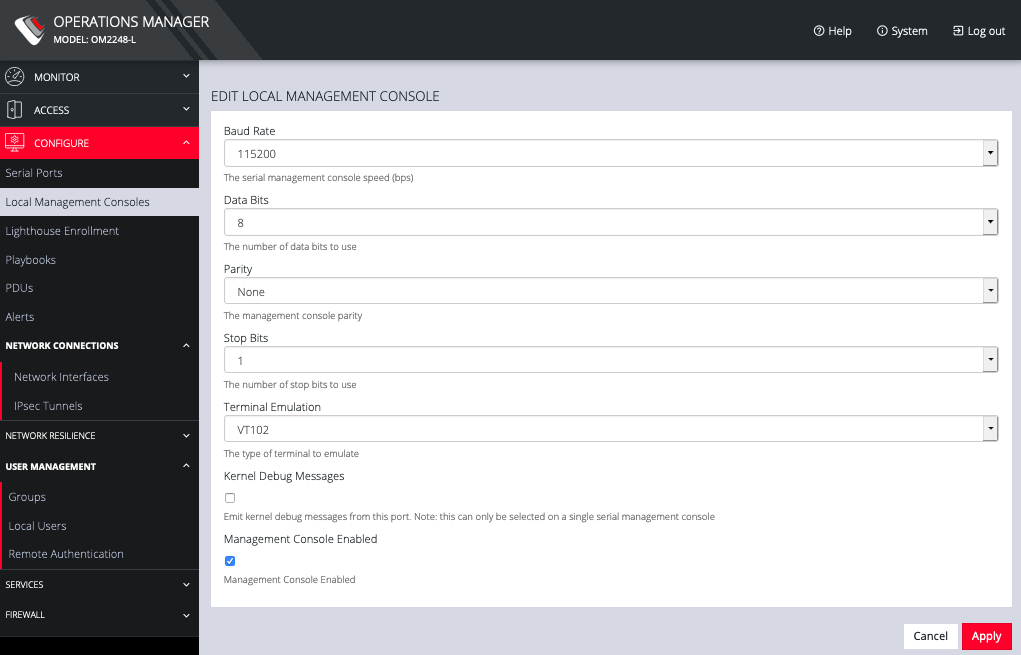
The Edit Local Management Console page lets you control:
-
Baud Rate
-
Data Bits
-
Parity
-
Stop Bits
-
Terminal Emulation
-
Enable or disable Kernel Debug Messages
-
Enable or disable the selected Management Console
-
Note: Enabling Kernel Debug Messages can only be applied to a single serial management console.
To disable a local management console, click CONFIGURE > Local Management Consoles. Click on the Disable Management Console Port button under Actions next to the console you wish to disable.