RemoteLocal for AAA Server
CONFIGURE > USER MANAGEMENT > Remote Authentication
CONFIGURE > USER MANAGEMENT > Local Users
RemoteLocal authentication allows users to be authenticated locally if they don't exist on the AAA server so that users can still access any consoles that are required to be accessed.
A RemoteLocal alert banner ensures all users are made aware that if the RemoteLocal policy is selected their local users will not be accessible.
If a RemoteDownLocal policy is selected and the AAA server is contactable, then local authentication won’t be used.

Note: This feature is backwards compatible with previous versions of software (the rest api version is unchanged).
Change Authentication Policy
Changing the Authentication policy is simple.
- Navigate to CONFIGURE > USER MANAGEMENT > Remote Authentication.
- Ensure the required protocol mode is selected (TACACS+, RADIUS, LDAP).
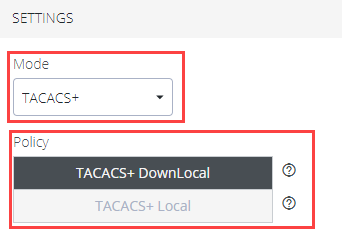
- Select the authentication policy you require (DownLocal or Local).
- Click Apply. The policy change is confirmed by a green confirmation banner.

Authentication Scenarios
The following example shows RADIUS protocol mode, but the behavior is the same for other protocols such as TACACS+ or LDAP.
- User does not exist:
- When using RemoteLocal authentication for all types of remote servers, if remote authentication fails because the user does not exist on the remote AAA server, the OM device will attempt to authenticate the user using a local account as per a regular local log in.
- Remote Server Down / Unreachable:
- If the remote AAA server is unreachable or down, the OM device tries to authenticate the user using a local account as per a regular local log in.
- Remote server is up, but incorrect credentials:
- The user is denied access. Warnings indicate that RemoteLocal is enabled.